
In short: Add Shipping Country, choose Equals or Not equals, and enter two-letter country codes such as US or US, CA. Shipping discounts apply once the customer has entered a shipping address. Product and order discounts can apply in the cart.
Set it up
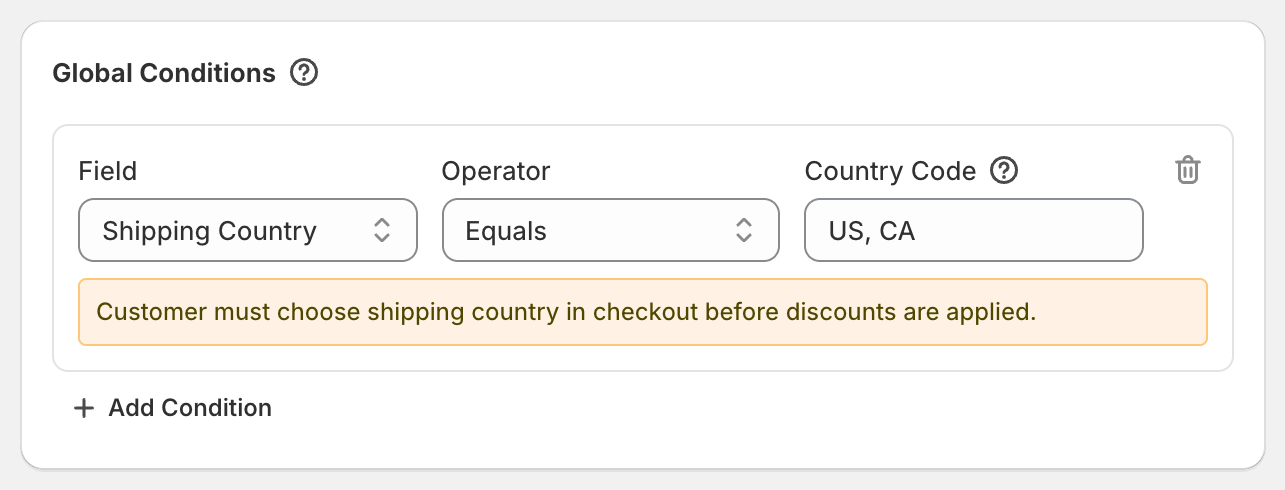
Click Add Condition and pick Shipping Country.
Choose Equals (only these countries) or Not equals (every country except these).
In Country Code, enter the two-letter code, for example
US,GB,CAorAU. Separate several countries with commas:US, CA.
Worked examples
Free shipping for UK orders only: on the shipping discount, Shipping Country Equals
GB.10% off everywhere except the US and Canada: Global Condition Shipping Country Not equals
US, CA.
Which country OneCode checks
Product and order discounts check the country your store is showing the customer, for example the one picked in your store's country selector. There's always a country, so these discounts can apply in the cart as well as at checkout.
Shipping discounts check the country of the shipping address. They only appear once checkout shows shipping rates, after the customer has entered an address.
The builder's note "Customer must choose shipping country in checkout before discounts are applied." is about shipping discounts. If customers often shop with the wrong country selected, a product or order discount can show in the cart for one country and change at checkout.
Good to know
Use country codes, not names.
United Kingdomwon't work;GBwill. The United Kingdom isGB, notUK.Capital letters don't matter:
usandUSboth work.For different offers per country, create one discount per country, or add one discount type per country inside the same code.