
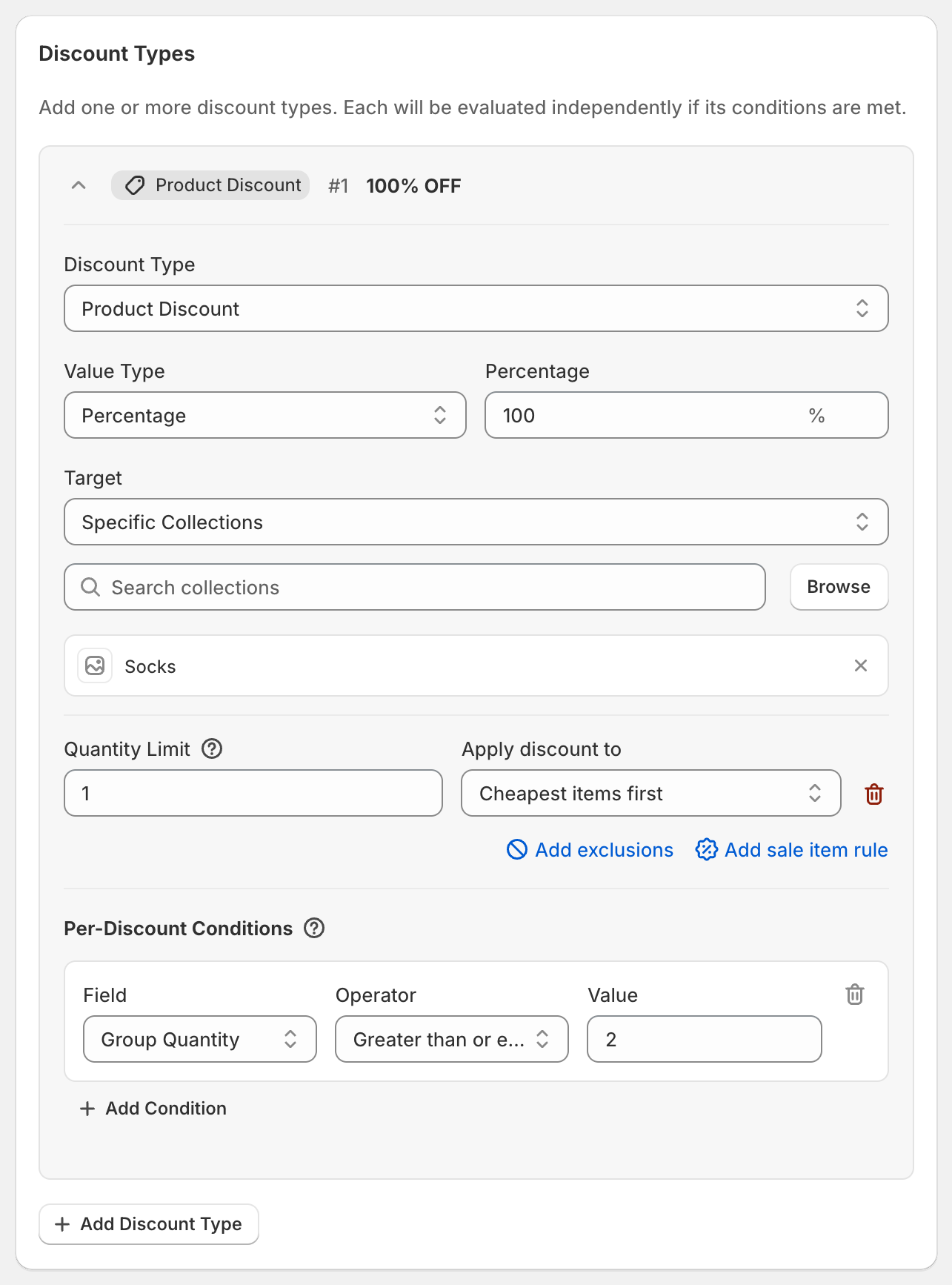
In short: Add a Product Discount of 100% on the collection, a Quantity Limit of 1 with Cheapest items first, and the Per-Discount Condition Group Quantity at least 2. When the customer buys 2, the cheaper one is free.
Steps
Click Create discount and choose a code or automatic discount.
Click Add Discount Type. Enter
100in Percentage, set Target to Specific Collections and pick the collection.Click Add quantity limit. Enter
1and set Apply discount to to Cheapest items first.Under Per-Discount Conditions, click Add Condition. Set Field to Group Quantity, Operator to Greater than or equal to and Value to
2.Click Save discount.
What the customer gets
Two pairs of socks at $12 and $15: the $12 pair is free.
One pair only: no discount, because Group Quantity is 1.
Variations
Buy 2, get 1 free: set Group Quantity to at least
3. With 3 items, the cheapest is free.Buy one, get one 50% off: use
50instead of100.Most expensive free: choose Most expensive items first.
Good to know
The quantity limit is per order. With a limit of
1, a customer buying 4 still gets one item free, not two.Two of the same product count as 2 items.
The free item must be in the cart. OneCode discounts items the customer adds; it doesn't add them for the customer.